The API doesn’t exist. Deck doesn’t need one.
Deck agents navigate any browser-accessible system — no API, no connector, no custom integration. If your team can open it in a browser and click through it, Deck can automate it.
Trusted by Sunrun, BILT, Entrata and more · No API required






Authenticate. Operate. Extract.





Your users connect once
End users link their accounts through Deck. Credentials are encrypted in Deck Vault. Sessions persist. MFA is handled automatically. Your application never touches a password.
Agents operate any software
Computer use agents navigate real interfaces — web apps, desktop software, legacy systems. They see what a human sees, reason about what's on screen, and take action. No selectors. No scripts. No APIs on the other end.
You get structured results
Every task returns structured output and schema-validated JSON. Define the output shape and Deck delivers it consistently, regardless of how the source renders its data. Documents and files can be captured alongside.
One agent or thousands.
Deck provisions isolated sessions on demand. Run agents in parallel across every user, every source, every time zone. No infrastructure to manage.
Design and run agents in minutes
The Deck Console is where you build, observe, and manage your agents. Prompt to create agents and tasks. Watch sessions live. Replay any step by step.
Explore the product →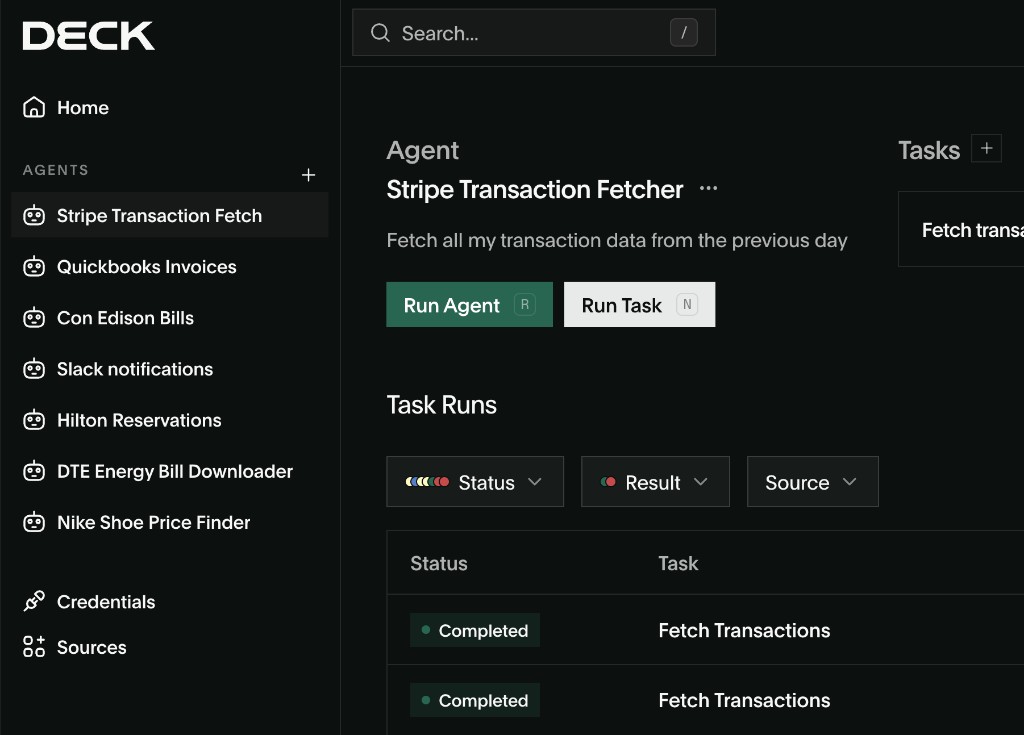
Embed computer use in your product
The Deck API lets you programmatically create agents, manage connections, execute tasks, and receive structured results.
Explore the API →Built for Production. Not Just Demos.
Enterprise-grade reliability with self-healing agents, encrypted credential vaults, and multi-model failover.
Authentication That Works
Deck handles MFA, SSO, and 2FA natively. Credentials stored in an encrypted vault with automatic rotation. Agents don't fail at login screens.
Self-Healing Agents
5 levels of autonomous error recovery. When something breaks, agents retry intelligently — only escalating to humans when they truly can't resolve it.
Fleet Management at Scale
One agent or one thousand — Deck provisions on demand. Persistent scheduling, parallel execution, and shared skill memory across your agent fleet.
Full Visibility Into Every Agent Action
Watch agents work in real time, replay any session step-by-step, and maintain a complete audit trail for compliance and debugging.
Frequently Asked Questions
Deck agents navigate browser UIs visually — clicking, typing, and navigating the same way a human would. No API call is made. The agent interacts directly with the interface.
Any browser-accessible system — legacy ERPs, government portals, payer platforms, loan origination systems, Citrix apps, county recording systems. If your team can log in and click through it, Deck can automate it.
Deck handles MFA, SSO, 2FA, and Citrix authentication natively. Credentials are stored in an encrypted vault and rotated automatically. Agents don’t fail at login screens.
Deck agents navigate visually and adapt when interfaces change. Because there are no hardcoded selectors, a layout update doesn’t break the workflow.
Yes. Citrix is one of Deck’s core use cases. It works natively — no Citrix RPA add-on, no brittle session configuration.
Book a demo. Tell us the system. We’ll run Deck on your workflow live — on your actual system, not a sandbox. Most teams are in production within a week.